



Robert Foss
March 08, 2017
Share this post:


Reading time:
Before being able to write firmware data to any production Chromebook device, the Write-Protect screw has to be removed.
This post will look specifically at removing the WP screw from a Chell (HP Chromebook 13 G1) device, and verifying that it has been successfully removed.
To actually flash firmware to Chromebook machines, a device called a Servo is needed. While these devices aren't available publicly, they can be produced freely or possibly requested from Google if you are contributing code to the ChromiumOS project.
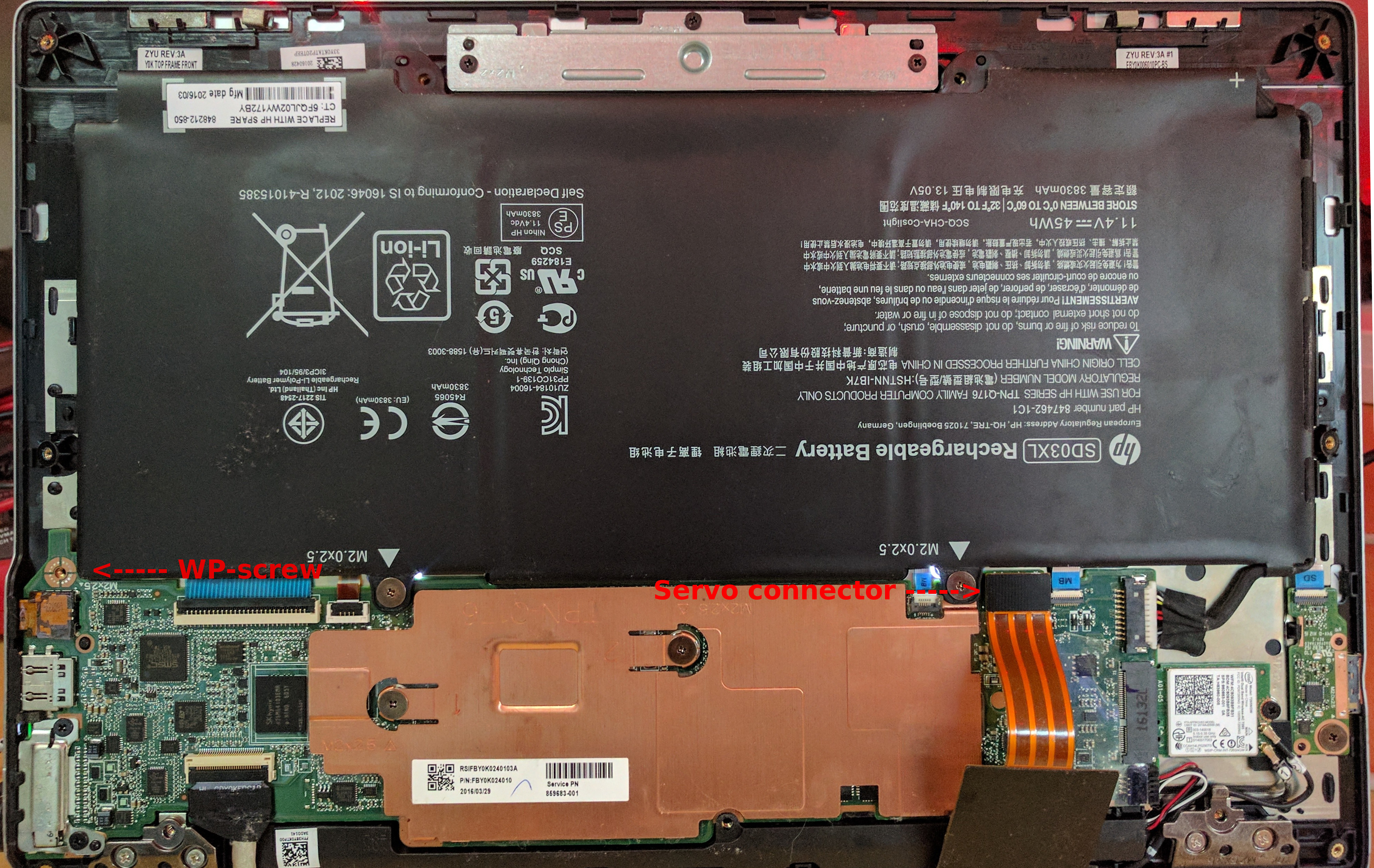
So this is what the WP screw looks like on a Chell Chromebook. This may or may not be what you will find in other devices. But if you take a close look, you will notice that the copper pad that the the screw attaches against is split into parts that are bridged by a screw being inserted.
So this is the part that requires a Servo device. And a ChromiumOS checkout, for some help setting one up, have a look at my previous post.
# Go to your ChromiumOS checkout cd /opt/chromiumos # Enter dev environment cros_sdk # Set device variable export BOARD=chell # Connect to Chromebook using a Servo device sudo servod -b $BOARD & # Disable WP # This step may vary depending on the hardware of your actual Chromebook dut-control fw_wp:off sudo /usr/sbin/flashrom -p ft2232_spi:type=servo-v2 --wp-disable sudo /usr/sbin/flashrom -p ec --wp-disable |
ChromiumOS Servo
Setting up a ChromiumOS dev environment
This post has been a part of work undertaken by my employer Collabora.
02/12/2025
As an active member of the freedesktop community, Collabora was busy at XDC 2025. Our graphics team delivered five talks, helped out in…
24/11/2025
LE Audio introduces a modern, low-power, low-latency Bluetooth® audio architecture that overcomes the limitations of classic Bluetooth®…
17/11/2025
Collabora’s long-term leadership in KernelCI has delivered a completely revamped architecture, new tooling, stronger infrastructure, and…
11/11/2025
Collabora extended the AdobeVFR dataset and trained a FasterViT-2 font recognition model on millions of samples. The result is a state-of-the-art…
31/10/2025
Collabora has advanced Monado's accessibility by making the OpenXR runtime supported by Google Cardboard and similar mobile VR viewers so…
27/10/2025
By resolving critical synchronization bugs in Zink’s Vulkan–OpenGL interop, Faith Ekstrand paved the way for Zink+NVK to become the default…
Whether writing a line of code or shaping a longer-term strategic software development plan, we'll help you navigate the ever-evolving world of Open Source.


 한국어 버전의 Collabora.com 보기
 Acesse Collabora.com em Português